1. 购买vps境外服务器
   可以参考该链接 http://www.vpser.net/ten-dollars-vps, 选择一款合适  (我选择了搬瓦工)

2. 在购买的vps上安装shadowsockts服务

   操作系统选择: Centos 7 x86_64 (python 2.7 required)

   安装pip
   curl https://bootstrap.pypa.io/get-pip.py -o get-pip.py
   python get-pip.py

   pip install shadowsocks

3. 在服务器上代理创建配置文件 /usr/local/lib/shadowsocks/config.json
   {
    "server":"购买的VPS服务的公网ip",
    "server_port":代理服务端口(不要使用最常见的443,很容易被封! 换个偏门的端口),
    "password":"代理服务器密码",
    "timeout":1000,
    "method":"aes-256-cfb"
    "fast_open":false,
    "workers":1
   }

4. 启动/停止代理
   启动:
   ssserver -c  /usr/local/lib/shadowsocks/config.json -d start
   停止:
   ssserver -c  /usr/local/lib/shadowsocks/config.json -d stop

5. shadowsocks客户端的下载

   https://github.com/shadowsocks

   Windows
   https://github.com/shadowsocks/shadowsocks-windows/releases
   Mac OS X
   https://github.com/shadowsocks/ShadowsocksX-NG/releases
   Linux
   https://github.com/shadowsocks/shadowsocks-qt5/wiki/Installation
   https://github.com/shadowsocks/shadowsocks-qt5/releases
   ios
   https://itunes.apple.com/app/apple-store/id1070901416?pt=2305194&ct=shadowsocks.org&mt=8
   https://github.com/shadowsocks/shadowsocks-iOS/releases
   android
   https://play.google.com/store/apps/details?id=com.github.shadowsocks
   https://github.com/shadowsocks/shadowsocks-android/releases

6. shadowsocks客户端配置。

   1) MacOS

      1.根据代理配置文件中的相关配置去配置客户端。如图6-1
      2.找到浏览器的代理配置部分, 选中SOCKS代理, 设置主机为127.0.0.1,端口为1080。如图6-2


   2) Windows系统
      1.需要安装.NET Framework 4.6.2 Developer Pack, 参考下面链接中的最后部分
         https://github.com/shadowsocks/shadowsocks-windows/wiki/Shadowsocks-Windows-%E4%BD%BF%E7%94%A8%E8%AF%B4%E6%98%8E
      2.下载shadowsocks-windows客户端,病配置好图6-1的相关配置
      3.启动系统代理


7. ssh远程连接vps服务器
   mac osx: 通过内置的ssh命令即可  需要
            1. ssh root@vps host -p ssh_port
            2. 输入root登录密码 ([email protected])
   windows: 通过xshell等 ssh 工具
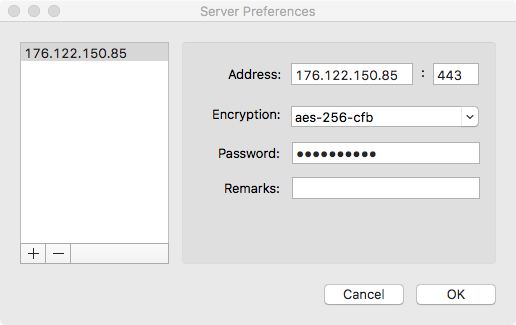
图6-1
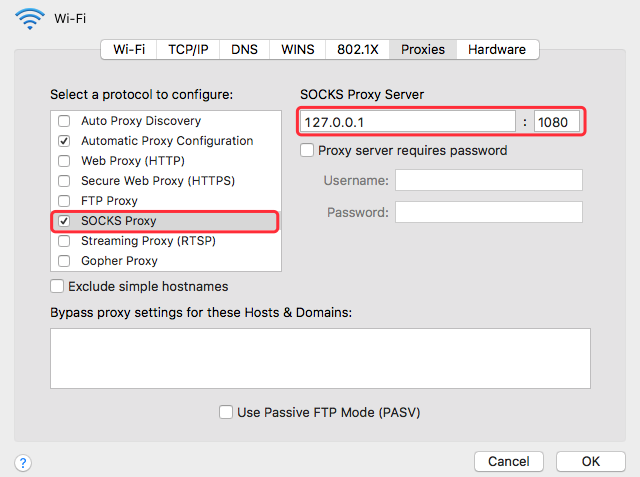
图6-2